Tsukinowa Driving School

Youtube
212,279
TikTok
200.8K
077-545-2222Weekdays 8:30~20:00 / Sat, Sun & holidays 8:30~18:00
Online booking of practical lessons & the shuttle bus

Practical lessons (regular plan), classroom lessons and shuttle bus reservations

① Go to the reservation site

🚘Practical lessons (standard car, regular plan)
🚌Shuttle bus
📖In-person classroom lessons

can be booked, changed, cancelled and checked on the website.

Click the button below to go to the reservation site.
Please make your reservation there.

② Enter your student number and password

[Student number]
Please enter your 5-digit number.

[Password]
If you enrolled in 2023 ➔ your date of birth as 6 digits in the Japanese calendar
Example: April 4, Heisei 17 → "170404"

If you enrolled in 2024 ➔ your date of birth as 8 digits in the Western calendar
Example: April 4, Heisei 17 → "20050404"

③ Log in

Click the "Login" button to log in.
After logging in, please follow the on-screen instructions to make your reservation.

③ Log in
③ Log in

How to book practical lessons on the Step Plan

How to book on the Step Plan

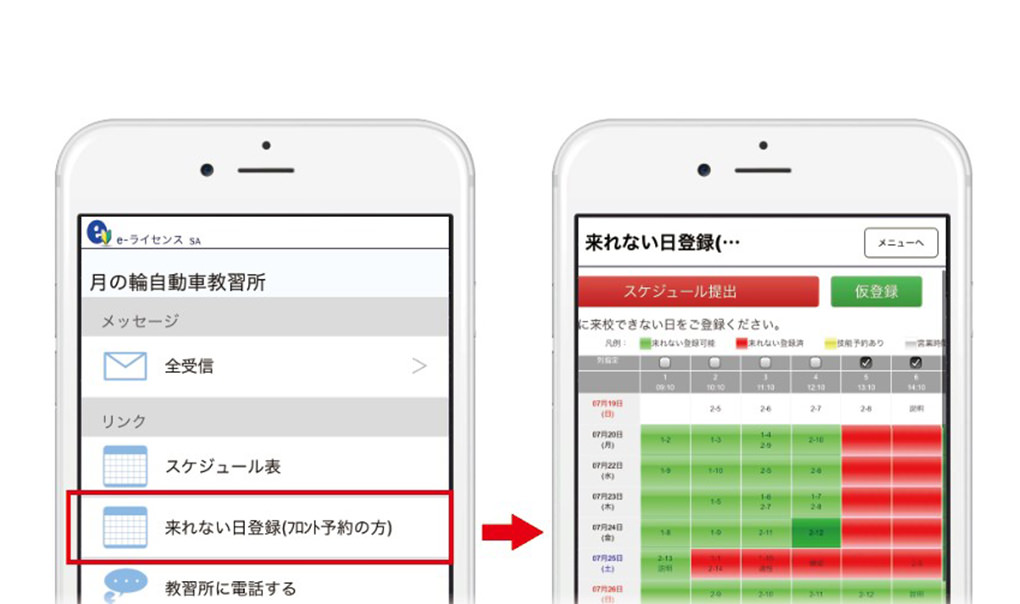
With the Step Plan, you register the "days you cannot come to the driving school", and our staff create an efficient schedule for you.
You can attend more smoothly than with the regular plan.

Even if you enrolled on the regular plan, you can upgrade by asking at the front desk.

※An option fee applies. The fee differs depending on the time of year, so please contact us for details.
※Depending on the time of year, it may not be possible to add it.

Booking the free shuttle bus works the same way as for the regular plans.

① Download the official app

Access it from the URL below, or search for the app name "e-ライセンスKS" and download it.

① Download the official app

② Enter your login ID, password and verification code

Your login ID is your student number. We will tell you on your enrollment day.

Login ID
(student number)
Student number, 5 digits
PasswordDate of birth, 8 digits (Western calendar)
(Example) April 1, 2005 → "20050401"
Verification code6006el32

③ Register the days you "cannot come" for lessons and submit them

For "Unavailable day registration," it is fine to register the schedule as far as you know it.
After registering, you will receive your confirmed lesson bookings, and then you can register additional days.

There is no deadline, but bookings fill up quickly, so we recommend registering early.

③ Register the days you "cannot come" for lessons and submit them

For details, please watch the video. (Common to the Step Plan / Omakase Booking Plan)

④ You will receive your schedule

To add days you "cannot come" or to change your schedule, please call the front desk.

Ask via chat